
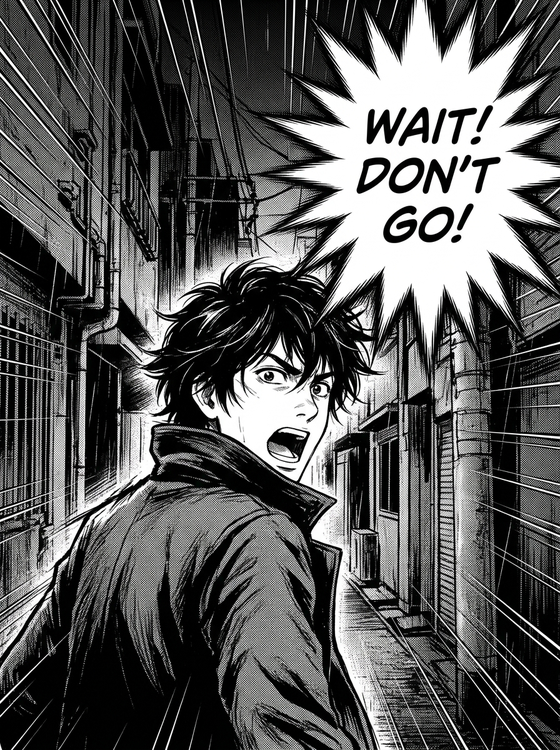
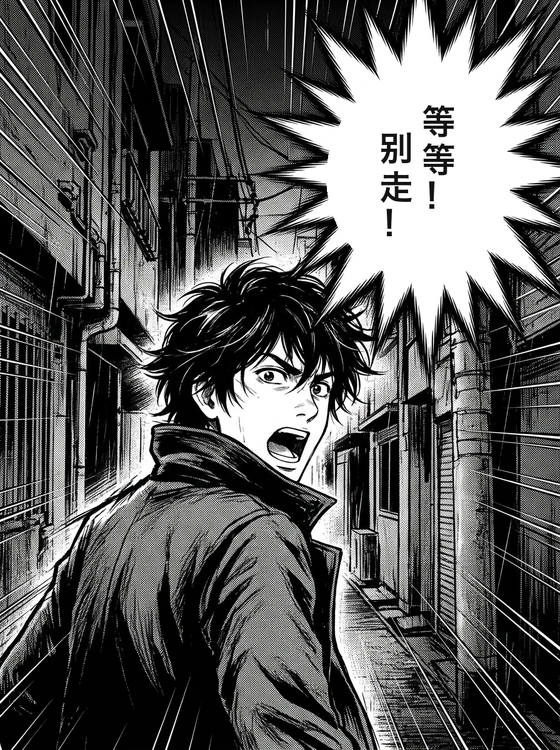
Every radial spike stays crisp
Instead of stamping a square box that chops off spikes, MangaInlay erases only the lettering inside the cavity while keeping every drawn stroke intact.
Browser extension for raw manga and webtoons. Click once and watch speech bubbles and tilted signs typeset cleanly inside original artwork.
30 free slices daily + 30 Day-1 bonus (~3 chapters) · No sign-up required · 0 quota on local & shared cloud cache hits
Instead of stamping a square box that chops off spikes, MangaInlay erases only the lettering inside the cavity while keeping every drawn stroke intact.


Door plaques, background notes, and hand-drawn sound effects stay intact, accompanied by matching color and tilt marginalia.
Curious about a punchline or raw phrasing? Hold Alt to temporarily hide overlays and inspect the raw panel, then release to keep reading.
Works on manga sites, encrypted <canvas> readers, long-strip webtoons, Pixiv, or X. Zero API keys or technical setup.
Grant permission once for the comic site and the bottom-right pill quietly translates panels as you read.
Translates 2 screens ahead as you scroll. Previously viewed or shared cloud-cached pages open instantly with 0 quota.
~1.5 chapters/day (~3 on Day 1)
Binge raw manga & webtoons without daily limits
Finish a series in a weekend (Monthly ¥19)
Browsers require page access so MangaInlay can read comic <img> or encrypted <canvas> frames on that page and draw overlays cleanly. We never inspect non-comic tabs or form inputs.
Long webtoons are processed in ~1800px slices. Free users receive 30 uncached slices per day (+30 Day-1 welcome bonus = ~3 chapters). Both local IndexedDB cache and shared cloud cache hits cost 0 quota, and safety-filtered panels never deduct quota.
Only compressed image slices are sent for AI bubble recognition when uncached; wiping and rendering stay local in your browser. Cloud cache stores only coordinate/translation JSON keyed by image SHA-256 hash.
Checkout initiated inside the extension auto-unlocks via polling within seconds without typing a key. If you encounter an unresolvable technical issue, email [email protected] for a prompt refund.
MangaInlay works on standard image-based manga sites, long-strip Korean webtoon readers, encrypted <canvas> readers, Pixiv, and X (Twitter) comic posts across Japanese, Korean, Traditional Chinese, and English.
Instead of stamping opaque white boxes that chop starburst spikes or force manual snipping, MangaInlay erases only the lettering inside each bubble cavity, matches color and tilt on signs, and prefetches 2 screens ahead as you scroll.
Yes. MangaInlay is officially published on both Chrome Web Store and Microsoft Edge Add-ons, plus a manual .zip package for Chromium browsers.
Step-by-step workflow for encrypted canvas readers, vertical webtoon strips, Pixiv short comics, and Hold-Alt comparison.
Read guide → 2026 COMPARISONHonest side-by-side matrix covering starburst preservation, long-strip prefetch, canvas support, setup effort, and pricing.
View comparison →