
Zero-config start
No API keys, no Python setup, and no sign-up required. You get 30 free slices daily plus a +30 Day-1 welcome bonus (~3 full chapters on Day 1), and cached pages use 0 quota.
Why typical raw manga translators look pasted-on
Most browser translators draw a blunt white rectangle over detected text bounds. On jagged Japanese shout bursts or full-color Korean webtoon backgrounds, those rectangles slice through radial spikes, screen tones, and door plaques. MangaInlay instead removes only the lettering inside each bubble cavity and matches background colors locally on an offscreen canvas. For tilted shop signs and hand-drawn sound effects, it keeps the original lettering visible and places color-matched marginalia beside it.
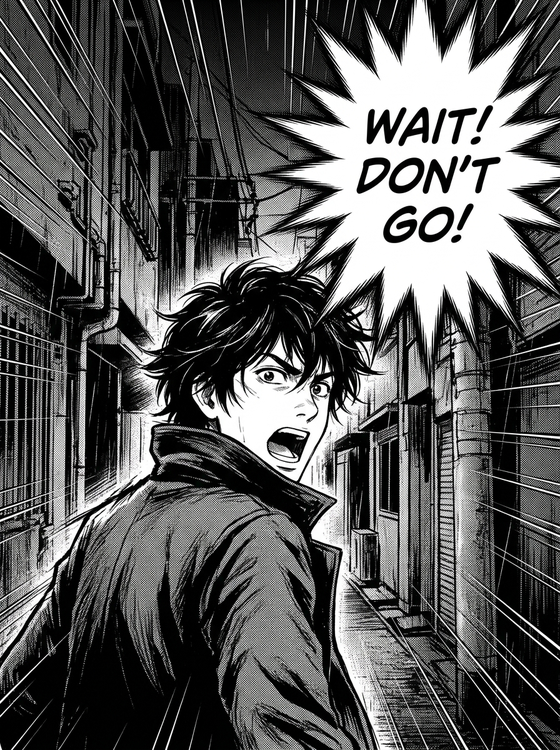 Before: Raw starburst shout bubble
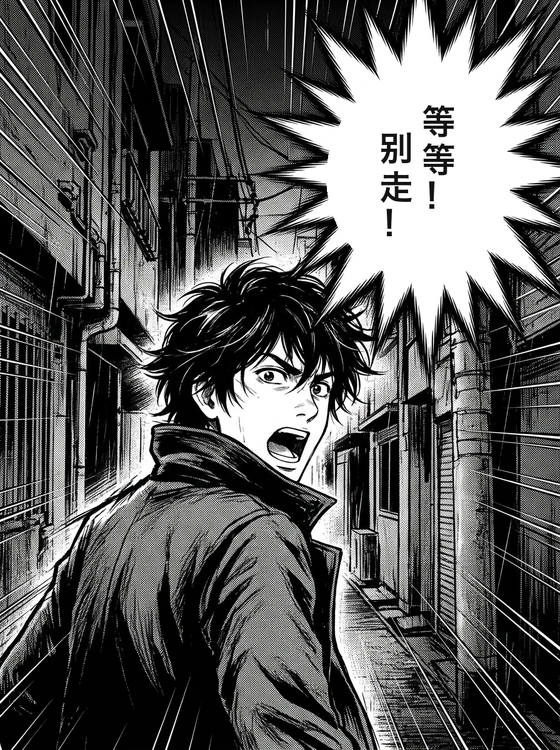 After: Text replaced inside cavity, radial spikes preserved
3-step workflow for Chrome & Edge
- Install MangaInlay from the Chrome Web Store or Microsoft Edge Add-ons.
- Open any raw chapter—whether it is a Japanese double-page viewer, an endless vertical Korean webtoon strip, an encrypted
<canvas>reader, Pixiv, or a comic thread on X (Twitter). - Click Translate Chapter and scroll: Grant one-time site access to that comic domain. MangaInlay translates visible panels immediately and prefetches 2 screens ahead as you scroll down.
Power tips for daily readers
- Hold
Altanytime to peek original art: Want to double-check a Japanese pun, honorific, or Korean slang? HoldAltto reveal the raw panel instantly, then release to return to the translated overlay. - Long webtoon auto-slicing: Tall webtoon images are split into ~1800px chunks so tiny dialogue stays crisp and readable without choking OCR.
- 0-quota local & shared cloud cache: Re-reading pages stored in your browser IndexedDB or reading popular chapters already translated in the shared coordinate cache consumes 0 daily slices.
Related reading
- 2026 Comparison: MangaInlay vs Ichigo Reader vs Scan Translator vs Immersive Translate
- Pricing & Global Monthly Pro ($4.9/mo) details
Try MangaInlay on your next raw chapter
60 free slices on Day 1 · 0 quota on cached hits · No API key required